

Passing Metadata
Pass data into a voiceform with Dynamic Variables, then fill them from the share link (or CSV email metadata). Use variables in question text with {{variable_name}}.
Create a dynamic variable
- Open your survey on the Create tab.
- Open a question and go to the Settings area (or survey settings where Dynamic Variables appears).
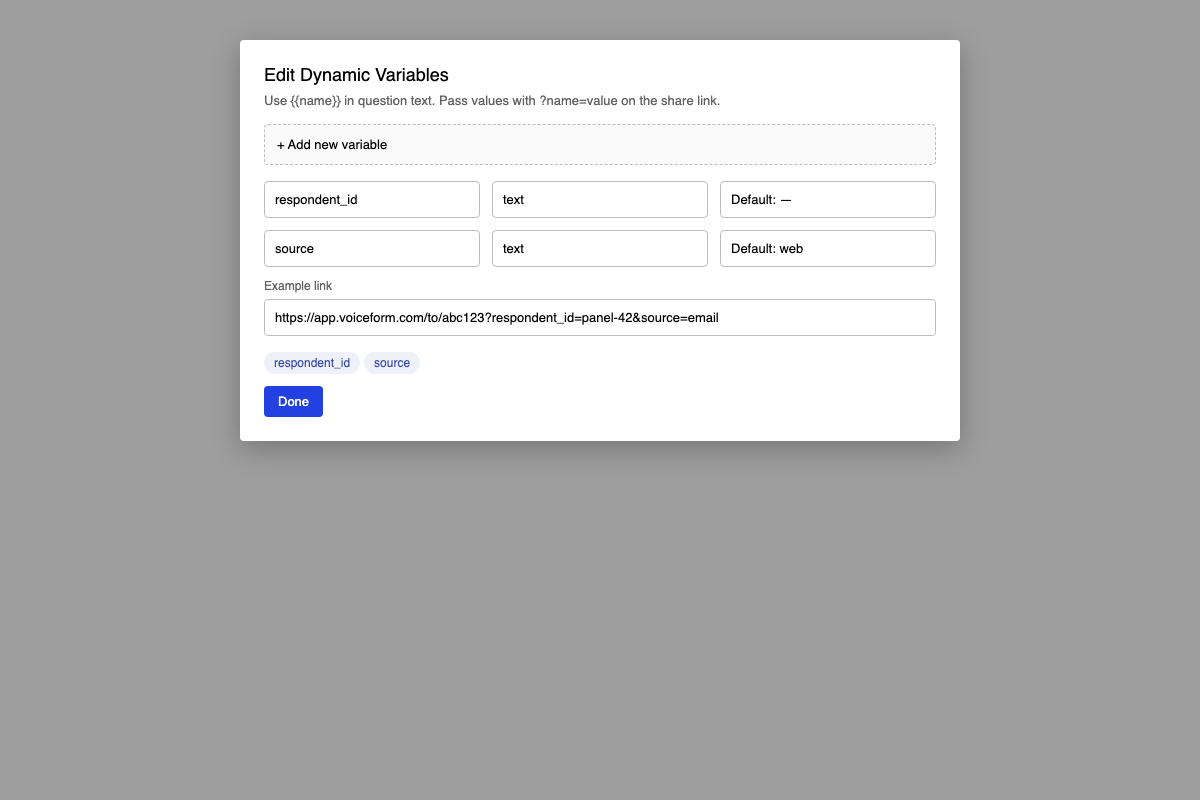
- Under Dynamic Variables, click Add new variable (or open the list to edit).
- In Edit Dynamic Variables, set:
- Name — used in
{{name}}and as the URL query key - Type — text, number, boolean, or object
- Default Value — used when the link does not include the parameter
- Name — used in
- Save the variable.
Use variables in the survey
In question titles or text, insert:
{{respondent_id}}Voiceform replaces the placeholder when the respondent opens the survey.
Pass values in the share link
Add query parameters that match your variable names:
https://app.voiceform.com/to/{hash}?respondent_id=panel-42&source=emailExample: variable foo → https://surveylink.com?foo=1234.
Metadata from email CSV
When you send by email with a CSV, columns besides email (for example name, phone number) are imported as metadata and passed through for tracking in results.
Related
Updated 3 months ago
Did this page help you?