

Webhooks
Notify an external HTTPS endpoint with a JSON POST whenever someone completes your voiceform. Webhooks are configured per survey under Connect → Webhooks (not account-wide).
For no-code automation, use Zapier on the Integrations tab instead.
Open Webhooks
- Open your survey on the Create tab.
- In the form header, click Connect.
- Open the Webhooks sub-tab.
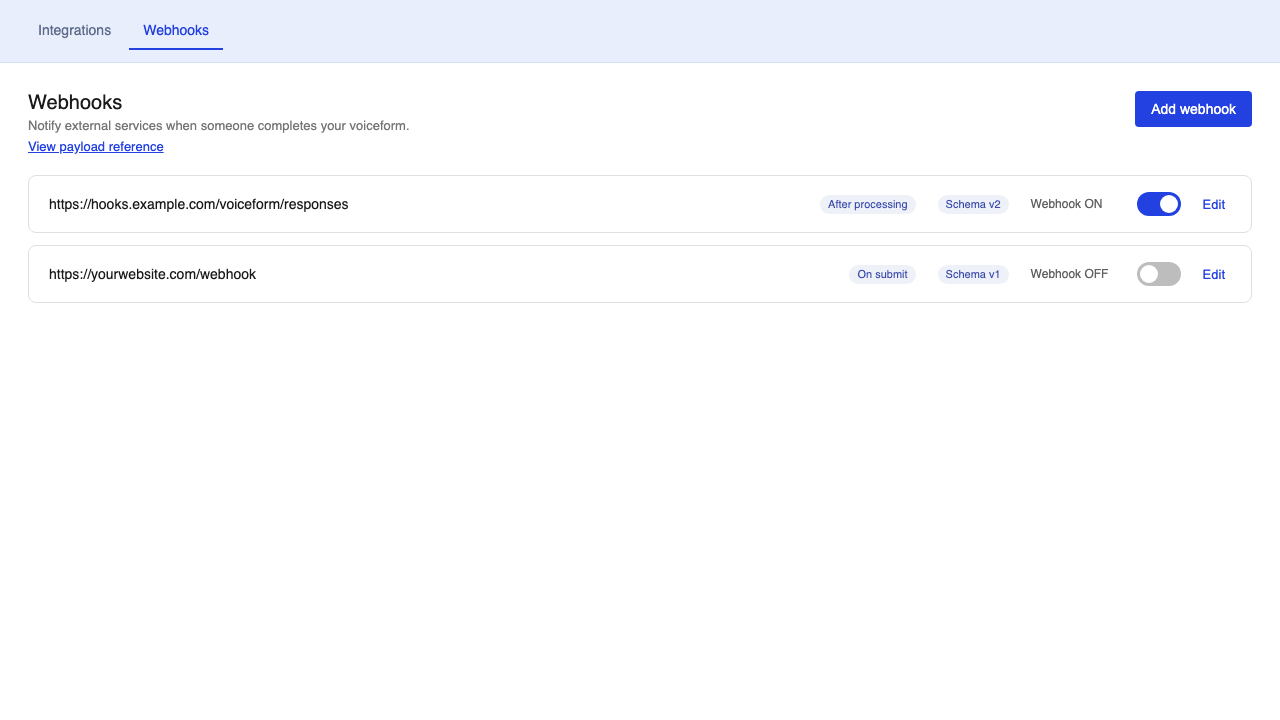
Empty state copy: No webhooks have been added to this voiceform yet.
Add a webhook
- Click Add webhook.
- Enter an Endpoint (must start with
http://orhttps://). - Choose When to send and Payload schema (see below).
- Click Save webhook.
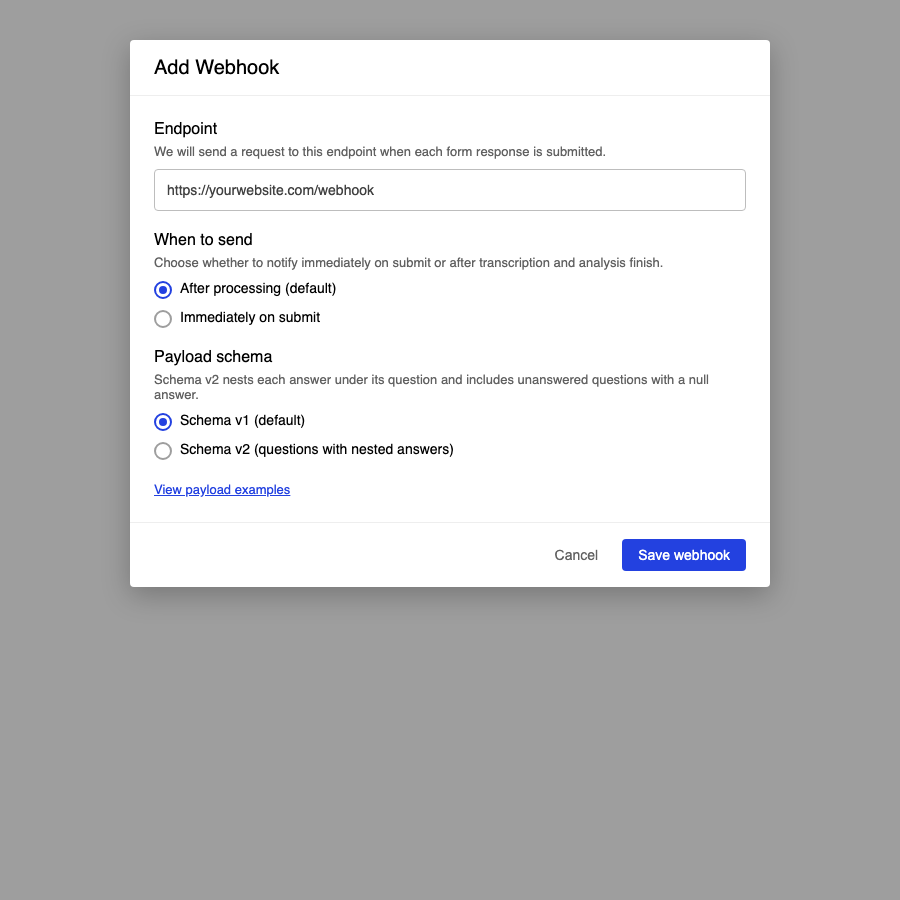
You can open View payload examples in the dialog (or View payload reference on the list page) for sample JSON.
Turn the webhook ON
New webhooks are created as Webhook OFF.
- In the list, flip the toggle to Webhook ON.
- Snackbar: The webhook is updated.
Nothing is delivered while OFFSaving a webhook does not enable it. Flip Webhook ON or Voiceform will not POST to your endpoint.
When to send
| Option | Trigger value | When it fires | Analytics fields |
|---|---|---|---|
| After processing (default) | after_processing | After transcription and analysis finish | transcript, sentiment, sentiment_score, keywords filled |
| Immediately on submit | on_submit | Right after the response is stored, before processing jobs | Those analytics fields are null |
The payload includes webhook_trigger with that value.
Payload schema
All schemas share top-level fields:
schema_version—v1,v2.1, orv2survey_id,response_id,response_hash,response_linkwebhook_triggerresponse_datastring_payload— JSON string of the payload without thestring_payloadkey itself
Answer objects can include loop_item (loop context, or null) and rendered_question_text (question text with loop placeholders resolved).
Schema v1 (default)
Answers-first: response_data.answers[] (each answer includes a nested question), plus a top-level questions[] list. Each answer may include loop_item and rendered_question_text (useful when the same question is answered multiple times in a loop).
{
  "schema_version": "v1",
  "survey_id": "550e8400-e29b-41d4-a716-446655440000",
  "response_id": "6ba7b810-9dad-11d1-80b4-00c04fd430c8",
  "response_hash": "a1b2c3d4",
  "response_link": "https://app.voiceform.com/dashboard/voiceform/.../results/respondents/...",
  "webhook_trigger": "after_processing",
  "response_data": {
    "form_title": "Customer feedback",
    "created_at": "2026-07-13T16:00:00+00:00",
    "started_at": "2026-07-13T15:59:12+00:00",
    "ended_at": "2026-07-13T16:00:00+00:00",
    "information_data": { "email": "[email protected]" },
    "metadata": { "response_id": "panel-123" },
    "total_recording_time_ms": 45200,
    "answers": [
      {
        "value": "{\"durationMs\":45200}",
        "transcript": "The product works great for our team.",
        "sentiment": "positive",
        "sentiment_score": 0.85,
        "keywords": ["product", "team"],
        "audio_url": "https://cdn.voiceform.com/responses/audio.webm",
        "loop_item": null,
        "rendered_question_text": "How do you feel about the product?",
        "question": {
          "id": "7c9e6679-7425-40de-944b-e07fc1f90ae7",
          "type": "voice-response",
          "text": "How do you feel about the product?"
        }
      }
    ]
  },
  "questions": [
    {
      "id": "7c9e6679-7425-40de-944b-e07fc1f90ae7",
      "text": "How do you feel about the product?",
      "type": "voice-response",
      "order": 1,
      "is_optional": false,
      "variable_name": null
    }
  ],
  "string_payload": "..."
}
Schema v2.1 (recommended)
Questions-first and loop-safe: response_data.questions[] each include answers[] with every answer for that question (including multiple loop iterations). For v2 compatibility, answer is the first item in answers[], or null when skipped (answer: null and answers: []). There is no top-level questions array.
{
  "schema_version": "v2.1",
  "survey_id": "550e8400-e29b-41d4-a716-446655440000",
  "response_id": "6ba7b810-9dad-11d1-80b4-00c04fd430c8",
  "response_hash": "a1b2c3d4",
  "response_link": "https://app.voiceform.com/dashboard/voiceform/.../results/respondents/...",
  "webhook_trigger": "after_processing",
  "response_data": {
    "form_title": "Customer feedback",
    "created_at": "2026-07-13T16:00:00+00:00",
    "information_data": { "email": "[email protected]" },
    "metadata": { "response_id": "panel-123" },
    "questions": [
      {
        "id": "7c9e6679-7425-40de-944b-e07fc1f90ae7",
        "type": "voice-response",
        "text": "How do you feel about {{loop_item.name}}?",
        "order": 1,
        "answer": {
          "value": "{\"durationMs\":1000}",
          "transcript": "Product A works",
          "sentiment": "positive",
          "loop_item": { "id": "a", "name": "Product A" },
          "rendered_question_text": "How do you feel about Product A?"
        },
        "answers": [
          {
            "value": "{\"durationMs\":1000}",
            "transcript": "Product A works",
            "sentiment": "positive",
            "loop_item": { "id": "a", "name": "Product A" },
            "rendered_question_text": "How do you feel about Product A?"
          },
          {
            "value": "{\"durationMs\":2000}",
            "transcript": "Product B needs work",
            "sentiment": "neutral",
            "loop_item": { "id": "b", "name": "Product B" },
            "rendered_question_text": "How do you feel about Product B?"
          }
        ]
      },
      {
        "id": "8d3e6679-7425-40de-944b-e07fc1f90ae8",
        "type": "voice-response",
        "text": "Anything else to add?",
        "order": 2,
        "is_optional": true,
        "answer": null,
        "answers": []
      }
    ]
  },
  "string_payload": "..."
}
Schema v2 (deprecated)
Questions-first with a single nested answer per question (answer: null when skipped). There is no answers[] array. For looping questions, only one answer is kept and extra loop iterations are dropped — prefer Schema v2.1.
{
  "schema_version": "v2",
  "survey_id": "550e8400-e29b-41d4-a716-446655440000",
  "response_id": "6ba7b810-9dad-11d1-80b4-00c04fd430c8",
  "response_hash": "a1b2c3d4",
  "response_link": "https://app.voiceform.com/dashboard/voiceform/.../results/respondents/...",
  "webhook_trigger": "after_processing",
  "response_data": {
    "form_title": "Customer feedback",
    "created_at": "2026-07-13T16:00:00+00:00",
    "information_data": { "email": "[email protected]" },
    "metadata": { "response_id": "panel-123" },
    "total_recording_time_ms": 45200,
    "questions": [
      {
        "id": "7c9e6679-7425-40de-944b-e07fc1f90ae7",
        "type": "voice-response",
        "text": "How do you feel about the product?",
        "order": 1,
        "answer": {
          "value": "{\"durationMs\":45200}",
          "transcript": "The product works great for our team.",
          "sentiment": "positive",
          "sentiment_score": 0.85,
          "keywords": ["product", "team"],
          "audio_url": "https://cdn.voiceform.com/responses/audio.webm",
          "loop_item": null,
          "rendered_question_text": "How do you feel about the product?"
        }
      },
      {
        "id": "8d3e6679-7425-40de-944b-e07fc1f90ae8",
        "type": "voice-response",
        "text": "Anything else to add?",
        "order": 2,
        "is_optional": true,
        "answer": null
      }
    ]
  },
  "string_payload": "..."
}
Note
total_recording_time_msappears only when Include total recording time (ms) is enabled on the webhook.
Edit options
Click Edit on a webhook to change endpoint, trigger, schema, and advanced options.
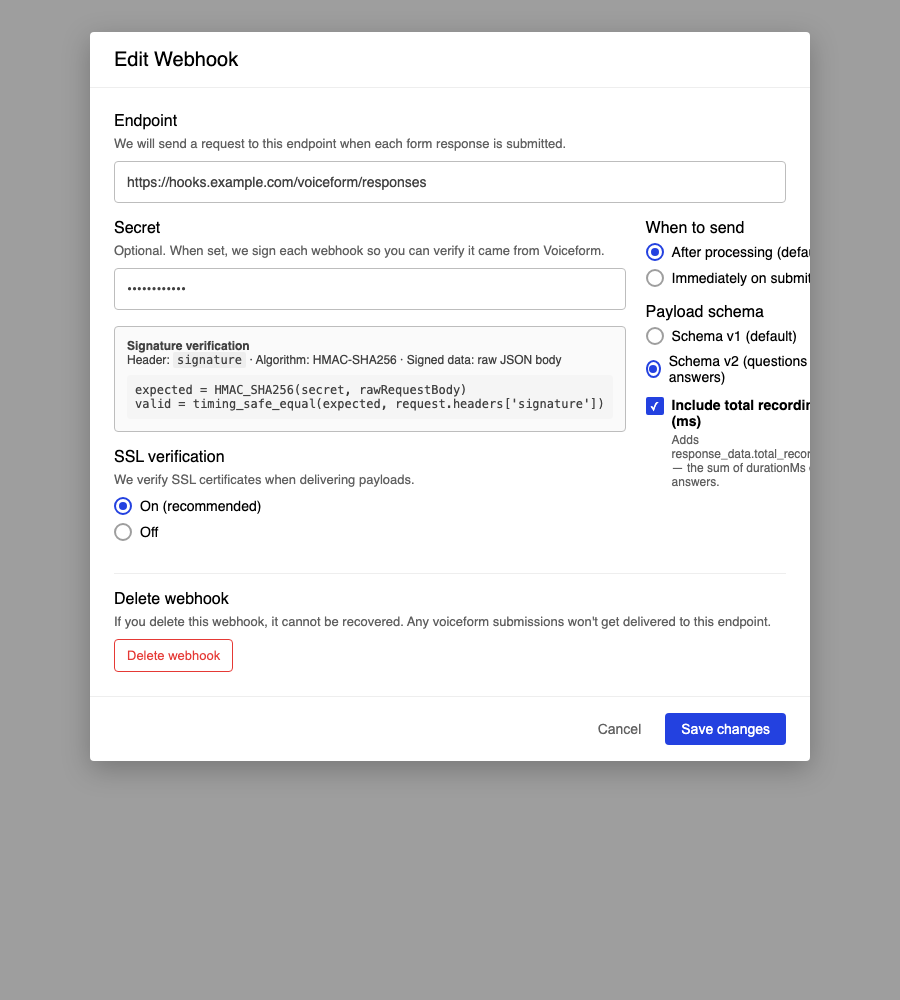
Secret (signature)
Optional. When set (minimum 8 characters), Voiceform signs each delivery so you can verify it came from us.
- Header:
signature - Algorithm: HMAC-SHA256
- Signed data: raw JSON request body
expected = HMAC_SHA256(secret, rawRequestBody)
valid = timing_safe_equal(expected, request.headers['signature'])
If no secret is set, webhooks are sent unsigned.
SSL verification
- On (recommended) — verify SSL certificates when delivering
- Off — skip certificate verification (only if your endpoint requires it)
Include total recording time (ms)
Adds response_data.total_recording_time_ms — the sum of durationMs on audio answers.
Delivery behavior
- Method: POST with
Content-Type: application/json - Timeout: about 3 seconds
- Retries: effectively one attempt (design your receiver to respond quickly)
- No in-app Send test or delivery log — use a catcher (for example webhook.site) and submit a real response
Webhooks are not sent when:
- The webhook is Webhook OFF
- The response is locked / over plan limit
- Survey data is locked (
data_locked_at) - The same webhook + response + trigger was already dispatched within about 24 hours (dedup)
Delete a webhook
From Edit Webhook, open Delete webhook. Confirm with Yes, delete webhook.
IrreversibleIf you delete this webhook, it cannot be recovered. Future submissions will not be delivered to that endpoint.
Video tutorial
Related
- Zapier — Connect → Integrations for Zapier
- How to Share and Embed a Voiceform — collect live submissions to test delivery
Updated 2 months ago